Live · Technician Mode

For the bay,
not the front counter.

The same extension your advisor uses up front now has a dedicated workflow for the tech in the back. One screen where every concern carries its own Verified status, Cause, Recommendations, and Parts. Tap a mic, narrate the finding, and the AI writes the customer-ready prose for you.
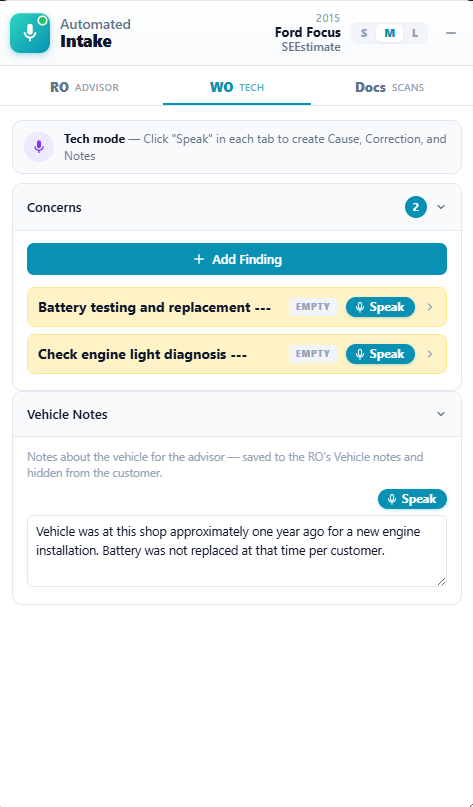
The WO Tech tab showing per-concern Speak mics
Speakper-concern mic
Customer-readyCause + Recs written

RO for the advisor. WO for the tech.

Switch tabs at the top of the sidebar. Each tab shows the same concerns but targets the workflow of the person looking at it.

RO · Advisor

The intake screen

Tap record, talk to the customer. Concerns and notes extract themselves and push to Tekmetric. Unchanged from what your advisors already use.

  • One recording captures the whole conversation
  • Concerns and RO notes extracted automatically
  • One-tap push to the open repair order
WO · Tech

The bay-side workflow

Every concern from the RO becomes a tech-focused card with Verified status, Cause, Recommendations, and Parts. Tap the mic to dictate the whole finding in one go.

  • Per-concern Verified Customer Concern (Yes/No)
  • Cause, Recommendations, and Parts fields
  • Copy Finding produces a clean, customer-safe block
Anatomy of a tech card

Amber means “needs you.” Green means “done.”

Each concern's title bar is color-coded so you can tell at a glance which ones still need attention. Empty cards glow amber. Once you've marked the concern Verified and filled in Cause and Recommendations, the bar flips to green.

That single visual rule keeps the whole concern list scannable when you've got a stack of work orders open. No reading, no scrolling, no guessing.

The WO Tech tab showing missing-detail prompts and a customer-ready Cause field

Four steps. Maybe sixty seconds.

Pick a concern, tap the mic, narrate your finding. The AI rewrites it as professional diagnostic prose, splits it into Cause and Recommendations, and flags any missing details inline.

01

Switch to WO

One tap at the top of the sidebar. Your concerns are already there, captured up front by the advisor.

02

Tap the mic

Speak your finding for 5 to 30 seconds. Codes, measurements, what you saw, what you'd recommend.

03

AI fills the fields

Cause becomes a customer-facing paragraph. Recommendations becomes a numbered list. Parts captures items the advisor wouldn't know to quote. All editable in place.

04

Copy Finding

One click copies a formatted, customer-ready block to your clipboard. Private notes stay out.

Private Notes

Some context isn't for the customer.

Every concern card has an optional Private Notes field. It's collapsed by default. Click to expand, type whatever you need, and rest knowing it never leaves the sidebar.

  • Internal context that helps the team make the right call
  • Copy Finding deliberately excludes Private Notes from the output
  • That separation is enforced in code, not a checkbox to remember
What it's for

The stuff you'd whisper to your service writer, not put on the invoice. "Customer always pushes back on aftermarket O2 sensors." "Last visit they declined the air filter, mention it again." "Watch the timing chain on this engine."

What it's not

Even if you fill the field, only the Cause paragraph and Recommendations list make it into the paste-ready block. The customer only ever sees what's meant for them.

Switch tabs. See for yourself.

Install Automated Intake, open any RO in Tekmetric, and tap the WO tab. Technician Mode is live today.